


If you are a website owner and you see traffic from China (CN) or Singapore (SG) in your analytics, you might be confused.
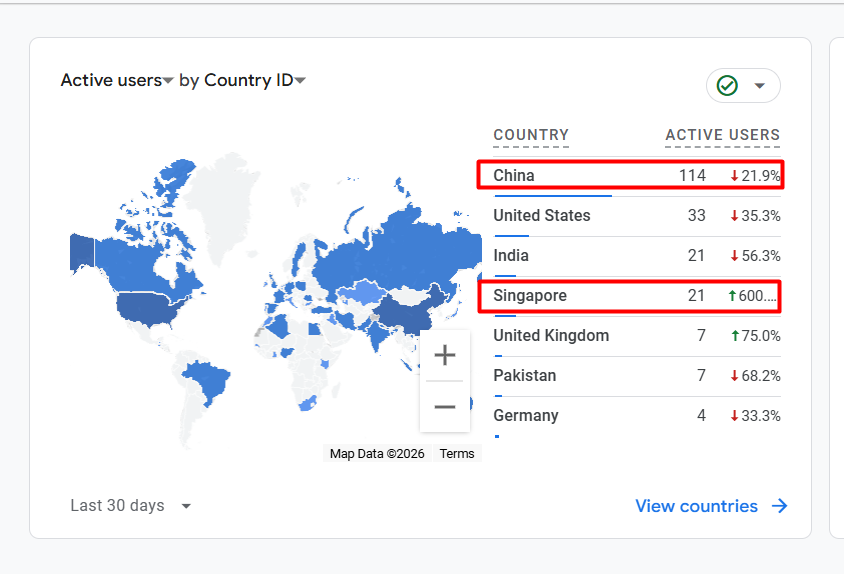
You may ask:
- I don’t target these countries.
- I don’t sell products there.
- why is my website getting traffic from China and Singapore?
In many cases, this traffic is not real users. Its AI scraping bots.
What Is AI Scraping?
AI scraping is when automated bots visit your website and copy your content.
These bots:
- Crawl your pages
- Read your blog posts
- Download images
- Collect data for AI training
Many AI companies use servers located in countries like China and Singapore. So when their bots scan your website, your analytics shows traffic from those countries.
This does not mean real students or customers are visiting your site.
Why Is AI Scraping a Problem?
AI scraping can:
- Confuse Analytics and website stats from real user traffic
- Increase server load
- Slow down your website
- Use your bandwidth
- Copy your content without permission
If you run a blog, news site, or digital service website, this can affect performance and SEO.
How to Check If It’s Bot Traffic
You may notice:
- High traffic but no conversions
- Very low time on site
- High bounce rate
- Strange user agents in server logs
If traffic is only coming from specific countries and not converting, it is likely bot traffic.
How to Block China and Singapore in Cloudflare
If you are using Cloudflare, you can block traffic from specific countries easily.
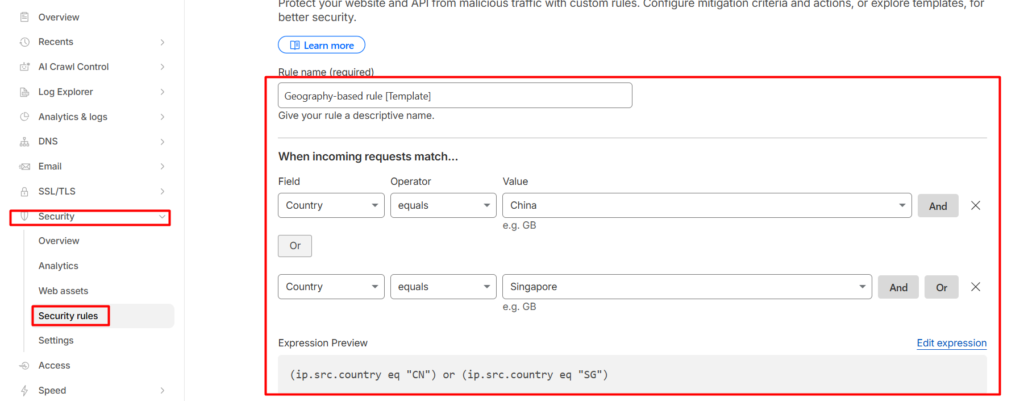
Step-by-Step:
- Login to your Cloudflare account
- Select your website
- Go to Security → WAF (Firewall Rules)
- Create a new rule
Use This Rule:
(ip.src.country eq "CN" or ip.src.country eq "SG")
Or cleaner version:
ip.src.country in {"CN" "SG"}
- Set Action to Block
- Save and deploy
Now traffic from China and Singapore will be blocked.
Important Note
Blocking countries is optional. Only do this if:
- You do not serve customers in those countries
- You are sure the traffic is bot-related
If you have real users there, blocking may affect them.
Final Thoughts
If you are seeing unexpected traffic from China and Singapore, it is often AI scraping bots — not real users.
Using Cloudflare firewall rules, you can protect your website, reduce server load, and keep your content safer.
If you want, I can also help you block specific AI bots like GPTBot, ClaudeBot, or others without blocking entire countries.